Tools#
Timeshift: backup and restore system for linux#
Similar to windows backup and restore.
Recommended before
apt upgradeorapt dist-upgrade
Installation:
sudo apt update
sudo apt install timeshift
Configure timeshift in GUI with:
sudo timeshift-gtk
Create a snapshot:
sudo timeshift --create --comments "Backup before upgrade <date>"
List and restore a snapshot:
timeshift --list
timeshift --restore --snapshot-id <snapshot-id>
If unbootable: boot from a live USB, install/run Timeshift there, point it at your root partition, and restore the desired snapshot.
Fish terminal#
Setup#
sudo apt update
sudo apt install fish
fish
# Install fisher extension management for fish
curl -sL https://git.io/fisher | source && fisher install jorgebucaran/fisher
# Install P10K theme alternative for fish (very similar), need meslo fronts
fisher install IlanCosman/tide@v6
tide configure
# Install better ctrl+R with full history display and scroll
fisher install PatrickF1/fzf.fish
# Install Z folder jumping navigation
fisher install jethrokuan/z
# Abbreviations tips
fisher install gazorby/fish-abbreviation-tips
Fish config can be accessed here: fish_config
Add fish autolaunch from zsh#
if [[ $(ps -o command= -p "$PPID" | awk '{print $1}') != 'fish' ]] && [[ ${SHLVL} -eq 1 ]]; then
    exec fish -l
fi
Ctrl-backspace#
The ctrl-backspace is not implemented by default. To add it:
fish_key_reader: then type ctrl-backspace in order to see the key code.If it says
ctrl-h, this means that the terminal don’t send the right key. But you can still add the binding: addbind \cH backward-kill-wordin the fish config file (~/.config/fish/config.fish).
!! and !$#
Add !! and !$ bindings for fish: Last command, and last argument of last command.
Edit: ~/.config/fish/config.fish, and add:
function bind_bang
    switch [commandline -t](-1)
        case "!"
            commandline -t -- $history[1]
            commandline -f repaint
        case "*"
            commandline -i !
    end
end

function bind_dollar
    switch [commandline -t](-1)
        case "!"
            commandline -f backward-delete-char history-token-search-backward
        case "*"
            commandline -i '$'
    end
end

function fish_user_key_bindings
    bind ! bind_bang
    bind '$' bind_dollar
end
Alternatives to p10k theme of zsh#
This is located here: ~/.config/fish/config.fish
However, fish is not POSIX compliant, so you can’t use it as a drop-in replacement for zshrc. You need to write your own config file. However, aliases are supported.
Use eza aliases from the setup in this page.
Appearance#
Borderless terminal.
Set MesloNG fonts
Set Konsole to use the MesloNG font.
Ctrl-Shift-M: Settings > Toolbars shown > uncheck everything
The following point is temporary.
Alt-F3: More actions > No tilebar and frame (same way to show it back)
Do to it permanently:
Alt-F3: More actions > Configure special application settings > Detect window properties > Click on Konsole window > (a new modal appear) > Select No tilebar and frameEdit the new entry: set it to yes, and “Apply initially” option in the corresponding dropdown.
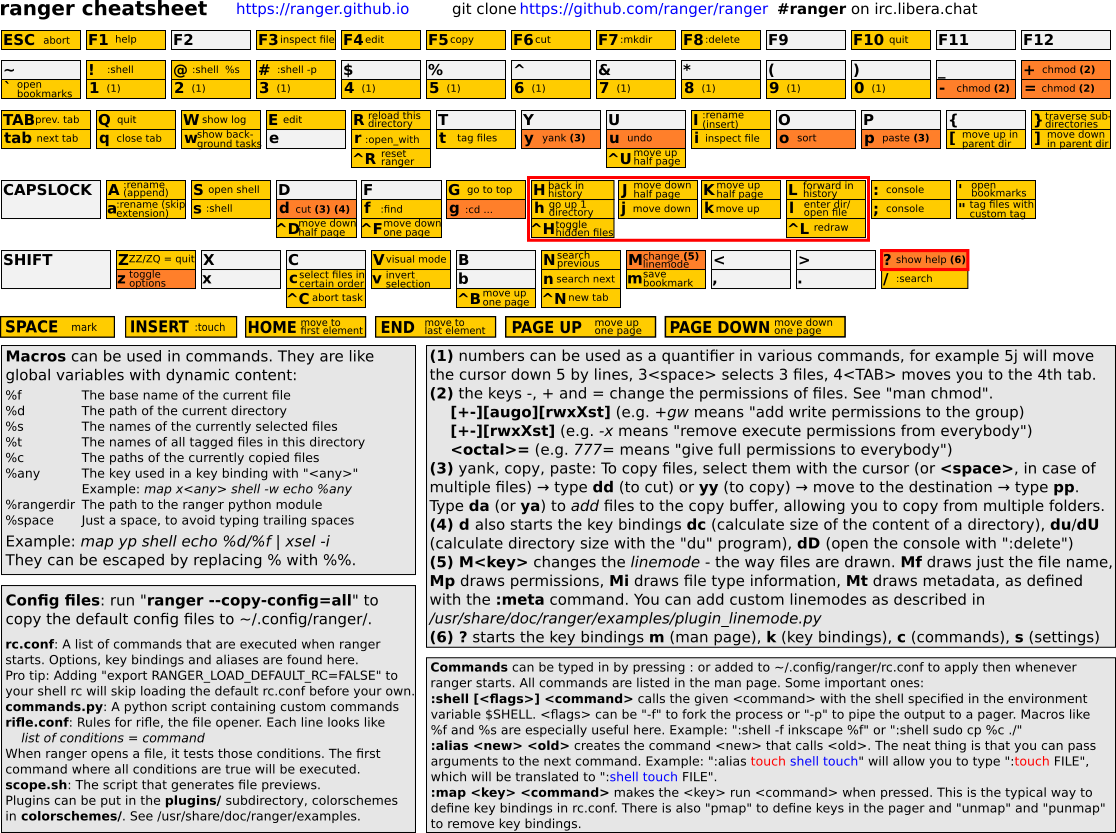
Yazi file manager install#
Use latest stable rust toolchain:
curl --proto '=https' --tlsv1.2 -sSf https://sh.rustup.rs | sh
rustup update
Clone the repository and build yazi:
git clone https://github.com/sxyazi/yazi.git
cd yazi
cargo build --release --locked
Add Yazi and ya to $PATH:
mv target/release/yazi target/release/ya /usr/local/bin/
Add this function to your fish config, that will provide the ability to change the current working directory when exiting yazi:
This will enable Yazi invocation using the y command.
Edit your fish config: ~/.config/fish/config.fish
function y
 set tmp (mktemp -t "yazi-cwd.XXXXXX")
 command yazi $argv --cwd-file="$tmp"
 if read -z cwd < "$tmp"; and [ "$cwd" != "$PWD" ]; and test -d "$cwd"
  builtin cd -- "$cwd"
 end
 rm -f -- "$tmp"
end
Micro editor#
https://micro-editor.github.io/
Go to sudo /usr/bin
Then
curl https://getmic.ro | bash
Edit file: micro file
Automatic terminal multiplexing on ssh with Byobu and fish#
Install byobu:
sudo apt update
sudo apt install byobu
Next enable fish as the default shell on byobu:
Edit file:
micro ~/.byobu/.tmux.conf
Add the following:
set -g default-shell /usr/bin/fish
set -g default-command /usr/bin/fish
Next automatically start byobu on ssh:
Edit file:
micro ~/.zprofile
Add the following:
_byobu_sourced=1 . /usr/bin/byobu-launch 2>/dev/null || true
Reminder, enable fkeys with:
Alt-F12: Enable mouse support
Ctrl-F12: Enable keybinds
My EZA setup#
Install eza:
cargo install eza
Zsh config
~/.zshrc
alias l='eza -Bhm --icons --no-user --git --time-style long-iso --group-directories-first --color=always --color-scale=age -F --no-permissions -s extension --git-ignore'
alias la='l -a'
alias ll='l -la'
alias lt='ll -T'
My EZA theme:
~/.config/eza/theme.yml
colourful: true
filekinds:
normal: { foreground: "#c0caf5" }
directory: { foreground: "#7aa2f7" }
symlink: { foreground: "#2ac3de" }
pipe: { foreground: "#414868" }
block_device: { foreground: "#e0af68" }
char_device: { foreground: "#e0af68" }
socket: { foreground: "#414868" }
special: { foreground: "#9d7cd8" }
executable: { foreground: "#42a5f5" }
mount_point: { foreground: "#a3be8c" }
perms:
user_read: { foreground: "#2ac3de" }
user_write: { foreground: "#bb9af7" }
user_execute_file: { foreground: "#9ece6a" }
user_execute_other: { foreground: "#9ece6a" }
group_read: { foreground: "#2ac3de" }
group_write: { foreground: "#ff9e64" }
group_execute: { foreground: "#9ece6a" }
other_read: { foreground: "#2ac3de" }
other_write: { foreground: "#ff007c" }
other_execute: { foreground: "#9ece6a" }
special_user_file: { foreground: "#ff007c" }
special_other: { foreground: "#db4b4b" }
attribute: { foreground: "#737aa2" }
size:
major: { foreground: "#2ac3de" }
minor: { foreground: "#9d7cd8" }
number_byte: { foreground: "#a9b1d6" }
number_kilo: { foreground: "#89ddff" }
number_mega: { foreground: "#2ac3de" }
number_giga: { foreground: "#ff9e64" }
number_huge: { foreground: "#ff007c" }
unit_byte: { foreground: "#a9b1d6" }
unit_kilo: { foreground: "#89ddff" }
unit_mega: { foreground: "#2ac3de" }
unit_giga: { foreground: "#ff9e64" }
unit_huge: { foreground: "#ff007c" }
users:
user_you: { foreground: "#3d59a1" }
user_root: { foreground: "#bb9af7" }
user_other: { foreground: "#2ac3de" }
group_yours: { foreground: "#89ddff" }
group_root: { foreground: "#bb9af7" }
group_other: { foreground: "#c0caf5" }
links:
normal: { foreground: "#89ddff" }
multi_link_file: { foreground: "#2ac3de" }
git:
new: { foreground: "#9ece6a" }
modified: { foreground: "#bb9af7" }
deleted: { foreground: "#db4b4b" }
renamed: { foreground: "#2ac3de" }
typechange: { foreground: "#2ac3de" }
ignored: { foreground: "#545c7e" }
conflicted: { foreground: "#ff9e64" }
git_repo:
branch_main: { foreground: "#737aa2" }
branch_other: { foreground: "#b4f9f8" }
git_clean: { foreground: "#292e42" }
git_dirty: { foreground: "#bb9af7" }
security_context:
colon: { foreground: "#545c7e" }
user: { foreground: "#737aa2" }
role: { foreground: "#2ac3de" }
typ: { foreground: "#3d59a1" }
range: { foreground: "#9d7cd8" }
file_type:
image: { foreground: "#89ddff" }
video: { foreground: "#b4f9f8" }
music: { foreground: "#73daca" }
lossless: { foreground: "#41a6b5" }
crypto: { foreground: "#db4b4b" }
document: { foreground: "#a9b1d6" }
compressed: { foreground: "#ff9e64" }
temp: { foreground: "#737aa2" }
compiled: { foreground: "#ffb86c" }
build: { foreground: "#1abc9c" }
nix: { foreground: "#7dcfff" }
python_env: { foreground: "#25cbd3" }
filenames:
__init__.py: {filename: {foreground: "#ffffff", bold: false, italic: true}, icon: {style: {foreground: "#ffffff", bold: true}}}
requirements.txt: {filename: {foreground: "#bb9af7"}, icon: {style: {foreground: "#bb9af7"}}}
pyproject.toml: {filename: {foreground: "#f7768e", bold: true}, icon: {style: {foreground: "#f7768e", bold: true}}}
poetry.lock: {filename: {foreground: "#89ddff"}, icon: {style: {foreground: "#89ddff"}}}
setup.py: {filename: {foreground: "#f7768e"}, icon: {style: {foreground: "#f7768e"}}}
shell.nix: {filename: {foreground: "#7dcfff"}, icon: {style: {foreground: "#7dcfff"}}}
default.nix: {filename: {foreground: "#7dcfff"}, icon: {style: {foreground: "#7dcfff"}}}
.env: {filename: {foreground: "#545c7e", italic: true}, icon: {style: {foreground: "#545c7e"}}}
.venv: {filename: {foreground: "#545c7e", italic: true}, icon: {style: {foreground: "#545c7e"}}}
.gitignore: {filename: {foreground: "#545c7e"}, icon: {style: {foreground: "#545c7e"}}}
test_*.py: {filename: {foreground: "#e0af68", italic: true}, icon: {style: {foreground: "#e0af68"}}}
extensions:
ipynb: {filename: {foreground: "#FD5B5B"}, icon: {style: {foreground: "#FD5B5B"}}}
py: {filename: {foreground: "#63A1FF"}, icon: {glyph: "", style: {foreground: "#63A1FF"}}}
pyc: {filename: {foreground: "#fdc2be"}, icon: {glyph: "", style: {foreground: "#fdc2be"}}}
pyo: {filename: {foreground: "#FFA500"}, icon: {glyph: "", style: {foreground: "#FFA500"}}}
pyi: {filename: {foreground: "#FFD700"}, icon: {glyph: "", style: {foreground: "#FFD700"}}}
toml: {filename: {foreground: "#6FC3DF", bold: true}, icon: {glyph: "", style: {foreground: "#6FC3DF"}}}
nix: {filename: {foreground: "#6dcf93"}, icon: {glyph: "", style: {foreground: "#6dcf93"}}}
yaml: {filename: {foreground: "#ffe066"}, icon: {glyph: "", style: {foreground: "#ffe066"}}}
yml: {filename: {foreground: "#ffe066"}, icon: {glyph: "", style: {foreground: "#ffe066"}}}
lock: {filename: {foreground: "#545c7e", italic: true}, icon: {glyph: "", style: {foreground: "#545c7e"}}}
sh: {filename: {foreground: "#5af78e", bold: true}, icon: {glyph: "", style: {foreground: "#5af78e"}}}
json: {filename: {foreground: "#21d7ff"}, icon: {glyph: "", style: {foreground: "#21d7ff"}}}
md: {filename: {foreground: "#ffffff", bold: true}, icon: {glyph: "", style: {foreground: "#ffffff"}}}
test: {filename: {foreground: "#fb61d7", italic: true}, icon: {glyph: "", style: {foreground: "#fb61d7", italic: true}}}
sql: {filename: {foreground: "#f6ae2d"}, icon: {glyph: "", style: {foreground: "#f6ae2d"}}}
csv: {filename: {foreground: "#ffd966"}, icon: {glyph: "", style: {foreground: "#ffd966"}}}
parquet: {filename: {foreground: "#FF4F4F"}, icon: {glyph: "", style: {foreground: "#FF4F4F"}}}
punctuation: { foreground: "#414868" }
date: { foreground: "#424242" }
inode: { foreground: "#737aa2" }
blocks: { foreground: "#737aa2" }
header: { foreground: "#a9b1d6" }
octal: { foreground: "#ff9e64" }
flags: { foreground: "#9d7cd8" }
symlink_path: { foreground: "#89ddff" }
control_char: { foreground: "#ff9e64" }
broken_symlink: { foreground: "#ff007c" }
broken_path_overlay: { foreground: "#ff007c" }
Debian, restart trackpad service#
sudo modprobe -r psmouse && sudo modprobe psmouse
Enable 2 finger support for Chrome (forward backward)#
Change shortcuts accordingly
(...chrome...) --enable-features=TouchpadOverscrollHistoryNavigation
Execute arbitrary commands when file change#
https://eradman.com/entrproject/
Do something when a file in a subfolder changes
The -c arg clears the screen everytime.
find . -type f -print0 | xargs -0 ls -d | entr -rc git status
Disk usage analyzer#
Terminal multiplexer#
byobu (really nice)
Make sure to enable mouse support and keybinds:
Shift + F12
Ctrl + F12
CLI file explorer#